配置WINDOWS右键打开
概述
在文件夹或文件配置右键打开
1. 通用
注册表中此项配置的路径为
# 文件夹
计算机\HKEY_CLASSES_ROOT\Directory\shell
# 文件
计算机\HKEY_CLASSES_ROOT\*\shell
# 空白右键
计算机\HKEY_CLASSES_ROOT\Directory\background
# 库右键
HKEY_CLASSES_ROOT\LibraryFolder\background\shell
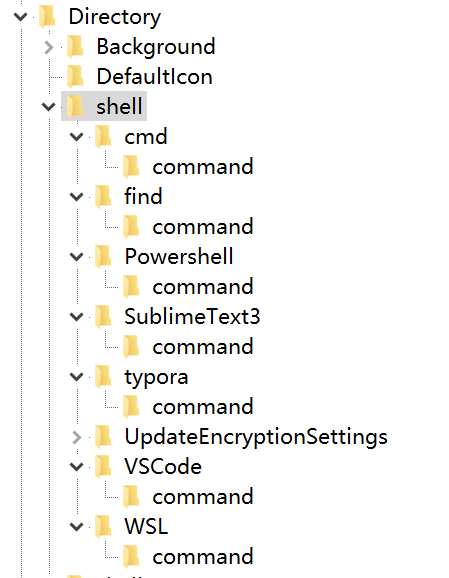

配置方法:
右键shell→ 项 ,添加名称
点击刚才添加的项,默认内容为右键后的名称

右键新建→字符串值/可扩展字符串值。名称为 Icon ,值为图标

右键新建→项,名称为command。默认值为打开文件的命令,command的默认值为 添加的程序的内容。

右键可以导出配置
2. 常用软件
2.1. typora
Windows Registry Editor Version 5.00
[HKEY_CLASSES_ROOT\Directory\shell\typora]
@="使用Typora打开"
"Icon"="E:\\app\\Typora\\bin\\typora.exe"
[HKEY_CLASSES_ROOT\Directory\shell\typora\command]
@="E:\\app\\Typora\\bin\\typora.exe \"%1\""2.2. sublime
文件
Windows Registry Editor Version 5.00
[HKEY_CLASSES_ROOT\*\shell\SublimeText3]
@="SublimeText3"
"Icon"="E:\\development\\sublime\\Sublime Text 3\\sublime_text.exe"
[HKEY_CLASSES_ROOT\*\shell\SublimeText3\command]
@="\"E:\\development\\sublime\\Sublime Text 3\\sublime_text.exe\" \"%1\" %*"文件夹
Windows Registry Editor Version 5.00
[HKEY_CLASSES_ROOT\Directory\shell\SublimeText3]
@="SublimeText3"
"Icon"="E:\\development\\sublime\\Sublime Text 3\\sublime_text.exe"
[HKEY_CLASSES_ROOT\Directory\shell\SublimeText3\command]
@="\"E:\\development\\sublime\\Sublime Text 3\\sublime_text.exe\" \"%1\""2.3. windows termianl
文件夹
Windows Registry Editor Version 5.00
[HKEY_CLASSES_ROOT\Directory\Background\shell\wt]
@="Windows Terminal Here"
"Icon"="C:\Users\first\AppData\Local\Microsoft\WindowsApps\wt.exe"
[HKEY_CLASSES_ROOT\Directory\Background\shell\wt\command]
@="C:\\Users\\first\\AppData\\Local\\Microsoft\\WindowsApps\\wt.exe -d ."库
Windows Registry Editor Version 5.00
[HKEY_CLASSES_ROOT\\LibraryFolder\\background\\shell\\wt]
@="Windows Terminal Here"
"Icon"="C:\\Users\\first\\AppData\\Local\\Microsoft\\WindowsApps\\wt.exe"
[HKEY_CLASSES_ROOT\\LibraryFolder\\background\\shell\\wt\\command]
@="C:\\Users\\first\\AppData\\Local\\Microsoft\\WindowsApps\\wt.exe -d ."Last updated
Was this helpful?

